In this guide
Wallets and access
Preserving a hardware wallet after a death
How to preserve a found hardware wallet, including how to recognise the main brands (Ledger, Trezor, BitBox and more): never guess the PIN, never reset it.
A hardware wallet (Ledger, Trezor and other brands) holds keys offline and is backed up by recovery material (commonly a recovery phrase, sometimes Shamir shares or another wallet-specific backup). The device itself is not the wallet, it is a key holder. How the wallet can be recovered depends on the exact model and the chosen configuration; recovery may be based on a seed phrase, shares, backup cards or devices, a wallet-specific backup, or a still-working signing device.
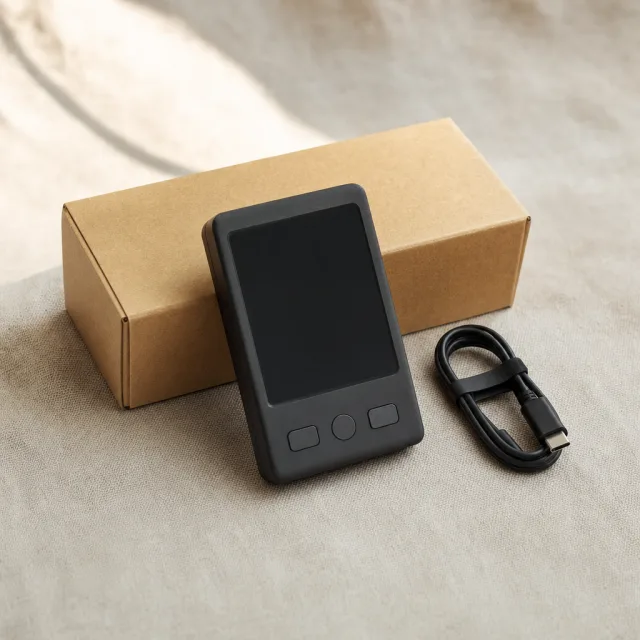
What a hardware wallet is
A hardware wallet protects secret key material with specialised hardware and can sign transactions with it. How the key and backups are exactly stored, copied or split varies by brand, model and configuration. It is a kind of safe: access typically requires either the device with its PIN, or the recovery material restored in compatible software. A visible balance after entering the PIN says nothing about ownership or legal title, and the device does not show a full overview anyway.
Which hardware wallet is it?
Hardware wallets use different recovery models. The essential recovery material can be a recovery phrase, shares, backup cards or devices, wallet-specific backups or other mechanisms. Do not assume that recovery words always exist; identify the exact model and the chosen configuration first. Nothing should be reset, updated or guessed. This list helps you identify a device found after a death, identification only, not a recommendation or a review.
The first move is always the same: preserve the device with its box and cable; never guess the PIN.
| Brand | How to recognise it | Official support |
|---|---|---|
| Ledger | Small device with a screen (Nano S, Nano X, Nano S Plus, Stax, Flex) | Support |
| Trezor | Device with a screen; controls differ per model and use physical buttons or a touchscreen (Model One, Model T, Safe 3, Safe 5, Safe 7) | Support |
| BitBox | Compact device with a screen and touch-sensitive controls (BitBox02) | Support |
| KeepKey | Larger device with a screen and a single-button design | Support |
| Coldcard | Depending on the model: compact device with a numeric keypad (Mk5) or a larger device with a full keyboard and QR scanner (Q) | Support |
| SafePal | Device with a screen; S1 and S1 Pro use a camera for QR codes, while the X1 works over Bluetooth | Support |
| Ellipal | Depending on the model: the Titan/Titan 2.0 is a standalone device with a large screen and camera; the X Card is an NFC card used with a compatible phone | Support |
| NGRAVE | Metal-framed device with a screen (ZERO) | Support |
| SecuX | Device with a screen; connections and wireless support differ per model (V20, W20, W10) | Support |
| Foundation | Shape differs per model: Passport Core has a screen with physical controls; Passport Prime has a touchscreen and home button | Support |
| Blockstream | Jade device with a screen; some models also have a camera for QR codes (Jade Classic, Jade Core, Jade Plus) | Support |
| OneKey | Device with a screen (Classic, Touch) | Support |
| D’CENT | Depending on the model: Biometric Wallet with a screen, navigation buttons and fingerprint sensor, or the D’CENT S as a screenless NFC card | Support |
| Keystone | Device with a large screen and a camera (3 Pro) | Support |
| Tangem | Screenless NFC wallet in card or ring form; held against a compatible phone | Support |
| Cypherock | Device with a screen and separate cards (X1) | Support |
Whatever the brand, never reset or update the device before the model and configuration are established; which recovery material is needed or replaceable depends on that configuration.
What to do
- Leave it as found, with its packaging, cable and manual if present.
- Note the model and any label, without photographing the screen.
- Record where it was found and who handled it.
- Preserve any recovery sheet found with it, flat, dry, out of sight.
- Store the device somewhere dry and safe; preserve its current state and do not start or charge it yourself without guidance.
What never to do
- Do not guess the PIN. Many devices wipe after a small number of wrong attempts; the exact number depends on the model and firmware, so do not rely on a general figure. A wiped device is one less path to the funds. Which recovery material is still needed depends on the model and configuration: it may be a recovery phrase, but also shares, backup cards or devices, or a wallet-specific backup.
- Do not factory-reset or wipe the device. Such an action can erase local key material, wallet data, settings and the PIN, destroying an existing access route. The exact effect and the available recovery route depend on the brand, model and configuration.
- Do not update firmware or connect the device to unfamiliar software: an update can make an old device unusable for restoration purposes.
- Do not photograph, scan or type the recovery phrase anywhere, never with an online phone. Follow the wallet manufacturer’s specific recovery procedure; do not routinely type hardware-wallet recovery words into desktop or mobile wallet software, even from an official channel. Specialist or legacy recovery may require a controlled offline approach.
PIN, seed phrase and passphrase
Three separate components determine access:
- PIN, protects the device itself. A forgotten PIN does not mean everything is lost, but it does not mean everything can be restored either.
- Seed phrase or other recovery material. Depending on the model and configuration, recovery may run through a recovery phrase, shares, backup cards or devices, or a wallet-specific backup; first establish what the model requires.
- Passphrase: an additional passphrase (not necessarily a word) added on top of the seed phrase. If one was set, the same seed phrase without the passphrase opens a different, usually empty, wallet.
Whoever has only the device does not yet have access. Whoever has only the seed phrase may be able to replace the device, but without the passphrase may see an empty wallet.
Why these rules
The device is not sufficient proof by itself: a visible balance or a power-on screen is not proof of ownership, access or legal title. The required recovery material (a recovery phrase, shares, backup cards or devices, a wallet-specific backup or a working signing device) is what matters, and it must not leave your hands until the estate’s authority is clear.
Authority before access
The device has been found, but who may open it depends on the succession situation: who the heirs are and which documents establish the executor’s or representative’s authority. Technical steps follow only after that authority is assessed.
What to do with it
- Access depends on the model and configuration. A working device with a valid PIN can be enough, or suitable recovery material on compatible hardware; additional data such as a passphrase may be required. Establish the model and configuration first.
- When the estate is ready: use the recovery method that belongs to this device and the chosen settings. That can be recovery words, but some hardware wallets use a different form of backup.
- If the recovery words are missing and the device is locked, do not reset it: the remaining options depend on the model, the state of the device, the PIN situation and the security version.
- The classic mistake: guessing the PIN (many devices wipe), resetting, or updating, each can close a path to the funds.
- If important recovery material is missing or the device no longer works: do not conclude straight away that the crypto is lost. What options remain depends on the device and the settings used. See wallet recovery for what is realistically possible.
- Until authority is confirmed, preserve the device with its box and cable and never guess the PIN.
Next
Understand what a passphrase changes, it can make an otherwise correct seed phrase open an empty wallet. See wallet passwords and passphrases for how that affects an estate.
For the index of the wallet formats covered in this library, see the wallet format library.
Sources and useful links
- Ledger, My device got reset: what should I do?Source accessed: 2026-08-07
- Trezor, Understanding wallet backups (12, 20 or 24 words)Source accessed: 2026-08-07